What “Ready to submit” means for your claim
Assist-only packet is ready—use claim Actions for payer channels, send the filing yourself, then mark Submitted when the payer acknowledges.
When a claim shows Ready to submit on your dashboard, it reflects where that claim is in BenAsk’s filing checklist—not a guarantee of payment from your carrier. Your employer’s plan and the carrier remain the legal source of truth for benefits.
For the full member-filed claim path (decide → wizard → COB → submit → EOB → appeals), start with the Claims journey hub.
Where you see this status
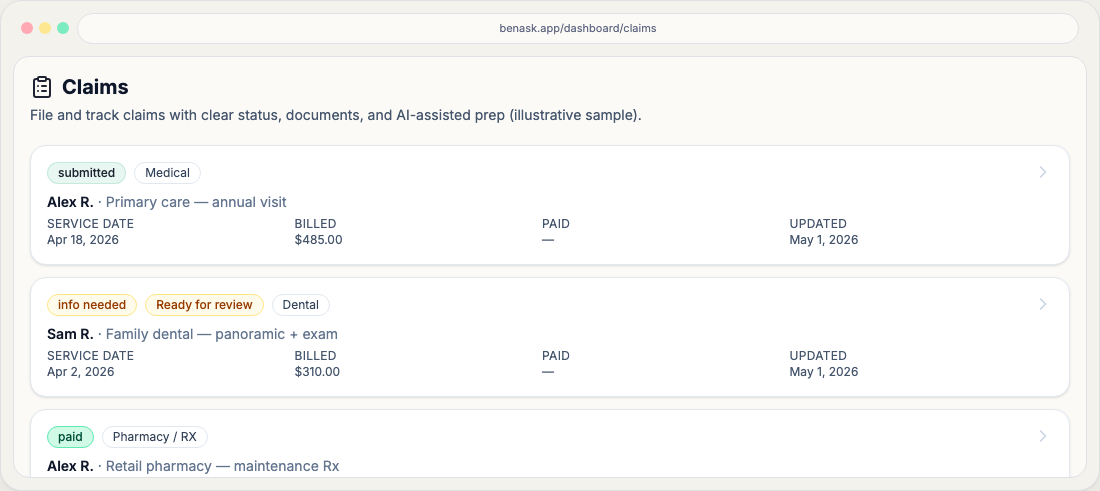
Open Claims from the dashboard. Each claim has a workflow status chip that updates as you add documents, finish the wizard, and record payer outcomes from Actions.
What to do next
Your packet is organized for you to send through the payer’s approved channel. Open the claim’s Actions tab for portal links, mail/fax targets, and optional copy-ready email text—BenAsk does not press “submit” to the carrier in Phase 1.
- Send the filing, then store the payer’s confirmation or reference ID with your personal records.
- After the payer acknowledges receipt, set workflow to **[Submitted](/help/claims/workflow/submitted)** from **Actions** so chips, inbox, and reminders stay truthful.
- If **missing required** documents still appear in the packet preview, upload them from **Documents** before or after you transmit—see the warnings on **Review & validate** and **Submit (assist)**.
FAQ
- Is this the same as my insurance claim status?
Often similar, but not always identical. BenAsk tracks your preparation and submission steps; carriers may use different labels in their portals.
- Can I change this status myself?
Some transitions happen when you complete steps in the app (for example, moving from draft to ready to submit). Others update when you record carrier outcomes.